

Introduction: My 10-Year Journey with WordPress Hosting
If there’s one thing I’ve learned after a decade of building blogs, affiliate sites, and client projects—it’s this: Your WordPress hosting can either grow your website… or silently kill it.
I’ve personally used cheap shared servers that crashed during traffic spikes, migrated sites at 2 AM because of downtime, and also experienced lightning-fast managed hosting that made everything effortless.
In this guide, I’ll walk you through everything I’ve learned about WordPress hosting—not theory, but real-world insights that actually matter.

What is WordPress Hosting?
At its core, WordPress hosting is a type of web hosting specifically optimized to run WordPress websites efficiently.
Unlike normal hosting, it includes:
- Pre-installed WordPress setup
- Server configurations optimized for speed
- Built-in caching systems
- Enhanced security for WordPress vulnerabilities
You can explore WordPress itself here: https://wordpress.org
Why Specialized WordPress Hosting Matters
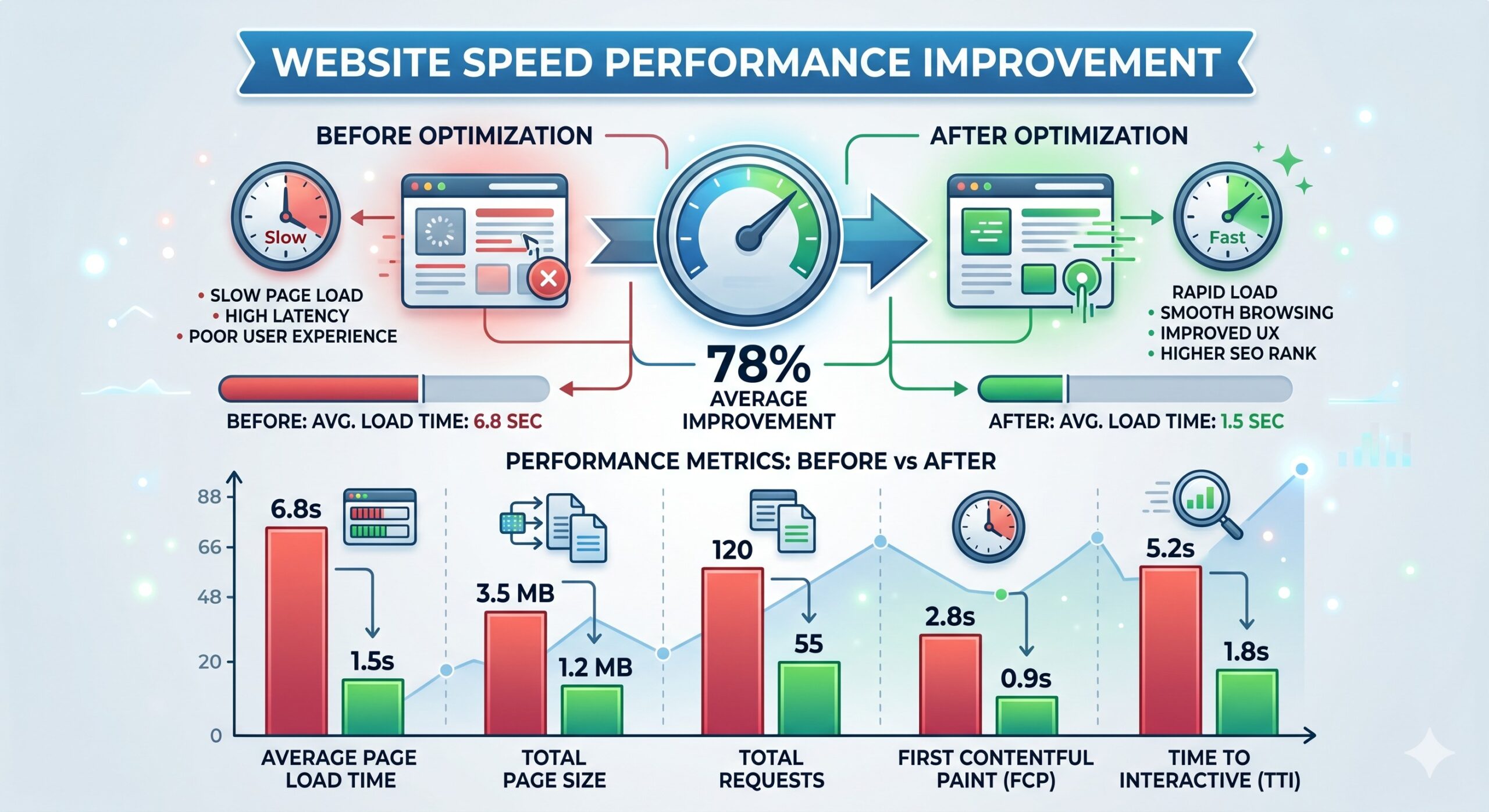
In my early days, I used generic hosting. My site took 5–6 seconds to load, and I didn’t understand why.
Once I switched to optimized WordPress hosting, my load time dropped to under 2 seconds—and traffic started increasing.
That’s when I realized: hosting isn’t just infrastructure, it’s performance.
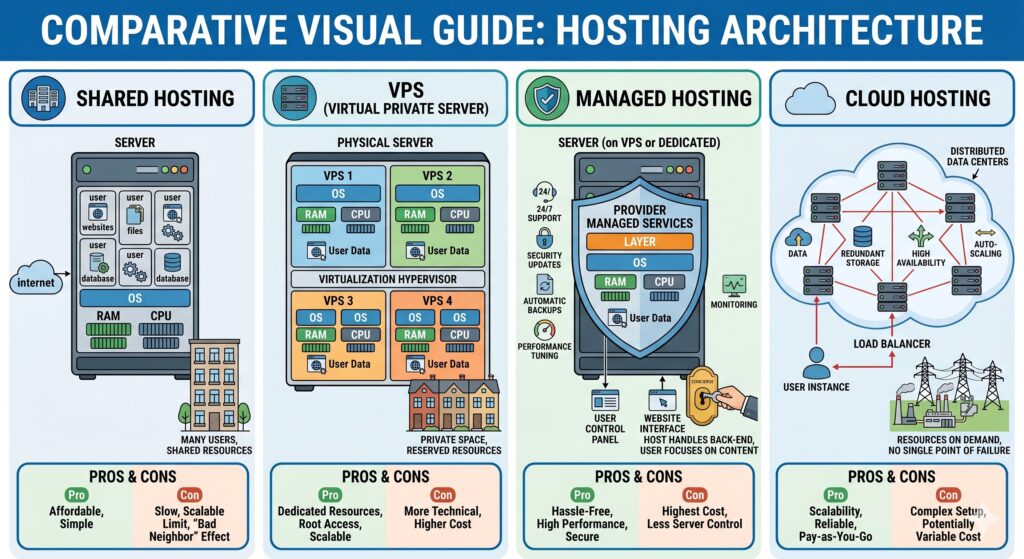
Types of WordPress Hosting (Explained Simply)
Choosing the right type of WordPress hosting is where most beginners go wrong. Let me break it down.
1. Shared WordPress Hosting
- Cheapest option
- Multiple websites share one server
My experience:
Good for beginners, but once your traffic grows, performance drops badly.
👉 Best for: New bloggers, low-budget starters
2. Managed WordPress Hosting
- Fully optimized for WordPress
- Automatic updates, backups, security
My experience:
This was a game-changer. I stopped worrying about technical issues and focused on content.
👉 Best for: Bloggers, agencies, serious creators
3. VPS (Virtual Private Server)
- Dedicated portion of a server
- More control and better performance
My experience:
Great power, but requires technical knowledge. Not beginner-friendly.
👉 Best for: Developers, advanced users
4. Cloud WordPress Hosting
- Uses multiple servers
- Highly scalable and reliable
My experience:
Perfect for traffic spikes. My affiliate site handled viral traffic without crashing.
👉 Best for: Growing websites, businesses
Key Features to Look for in WordPress Hosting
After testing multiple providers, I always check these essentials:
🚀 Speed & Performance
- SSD or NVMe storage
- Built-in caching
- CDN integration
Use tools like Google PageSpeed Insights: https://pagespeed.web.dev
👉 Faster WordPress hosting = better SEO + user experience
🔒 Security
- Free SSL certificates
- Malware protection
- Daily backups
I once lost a site due to a hack—since then, I never compromise on security.
⏱️ Uptime Guarantee
Look for at least 99.9% uptime.
Even 1% downtime = lost traffic + revenue.
📞 Customer Support
Trust me, this matters more than you think.
I’ve had hosting issues at midnight, and good support saved me hours.
📈 Scalability
Your hosting should grow with your website.
Avoid platforms that force migration later—it’s painful.
Real-Life Lessons from 10 Years of WordPress Hosting
Let me share some honest experiences.
1. Cheap Hosting Costs More Later
I once saved ₹200/month… but lost thousands in revenue due to slow speed.
2. Migration is NOT Easy
Moving websites between hosting providers sounds simple—but it’s not.
- Broken links
- Downtime
- SEO impact
Now, I always choose reliable WordPress hosting from the start.
3. Speed Directly Impacts Earnings
After upgrading hosting, my affiliate conversions increased by 30%.
That’s the power of fast WordPress hosting.
Mistakes Beginners Make Choosing WordPress Hosting
I see these mistakes every week in Facebook groups and Reddit threads.
Skipping the backup system. I once assumed my host backed up daily. They did weekly. When I accidentally deleted a table, I lost five blog posts. Now, I use two backup systems: one from my host and one from a plugin like UpdraftPlus.
Choosing by price alone. The $2.99/month plan looks tempting. But you will pay with your time (and sanity) when support tickets go unanswered.
Ignoring renewal prices. Many hosts offer 70% off for the first term. Year two might cost $30/month. Always check the renewal rate before clicking “buy.”
Best WordPress Hosting Providers (Comparison Table)
Here’s a practical comparison based on my experience:
| Hosting Provider | Speed | Uptime | Pricing | Support | Best For |
|---|---|---|---|---|---|
| Bluehost | Good | 99.9% | Affordable | Decent | Beginners |
| SiteGround | Very Fast | 99.99% | Medium | Excellent | Bloggers |
| Hostinger | Fast | 99.9% | Budget-friendly | Good | Starters |
| WP Engine | Ultra Fast | 99.99% | Premium | Top-tier | Professionals |
| Cloudways | Excellent | 99.99% | Flexible | Great | Scaling websites |
How to Choose the Right WordPress Hosting
Here’s my simple framework:
Step 1: Define Your Goal
- Blog → Shared or managed
- Business → Managed or cloud
Step 2: Estimate Traffic
- Low → Shared
- Medium → Managed
- High → Cloud/VPS
Step 3: Budget Smartly
Don’t go cheapest—go value for money.
My Personal Recommendation (Based on Experience)
If you’re starting out:
👉 Go with Hostinger or Bluehost
If you’re serious:
👉 Choose SiteGround or Cloudways
If you want premium performance:
👉 Go for WP Engine
Final Thoughts: Why WordPress Hosting is Your Foundation
After 10 years, I can confidently say:
👉 Your success online depends heavily on your WordPress hosting.
It affects:
- SEO rankings
- User experience
- Conversion rates
- Website stability
Don’t treat hosting as an expense—treat it as an investment.
Conclusion: Your Website Deserves Better
After ten years, dozens of migrations, and thousands of dollars spent on WordPress hosting, I have one clear truth: Never treat hosting as an expense. Treat it as an investment.
A fast, secure, and reliable host improves your SEO rankings, increases conversions, and lowers your daily stress. You do not need the most expensive plan. But you should avoid the cheapest.
Start with managed WordPress hosting from a mid-tier provider like SiteGround or Cloudways. Test your speed using GTmetrix. If your Largest Contentful Paint (LCP) stays under 2.5 seconds, you have found a winner.
Your next step: Open a new tab. Check your current hosting renewal date. If it is less than 30 days away, run a speed test right now. Then compare your results against the table above.
Have you had a hosting horror story or a speed win? Share it in the comments—I read every single one. Or you can signup our newsletter for more updates.
🚀 Final Tip (From Experience)
Don’t wait for your website to break before upgrading hosting.
Start strong—and your growth will be much smoother.